
TCS Shipment Rate Calculator
TCS Shipment Rate Calculator
Estimate domestic courier charges
TCS Shipment Rate Calculator Step-by-Step Guide
TCS Shipment Rate Calculator. If you frequently send parcels or documents within Pakistan or abroad, knowing the shipping cost in advance is essential. TCS, Pakistan’s leading courier service, offers an easy-to-use shipment rate calculator that helps you estimate charges based on the origin, destination, weight, and service type. In this article, we’ll provide a step-by-step guide on how to use the TCS Rate Calculator so you can plan your deliveries better.
What is the TCS Shipment Rate Calculator?
The TCS Rate Calculator is a simple online tool provided by TCS that allows customers to:
- Check the cost of sending parcels domestically or internationally.
- Estimate charges before visiting a TCS Express Centre.
- Compare rates for different zones and services.
This helps customers avoid surprises and plan their shipments effectively.
Step-by-Step Guide to Using the TCS Rate Calculator
Here’s how you can calculate shipment charges online:
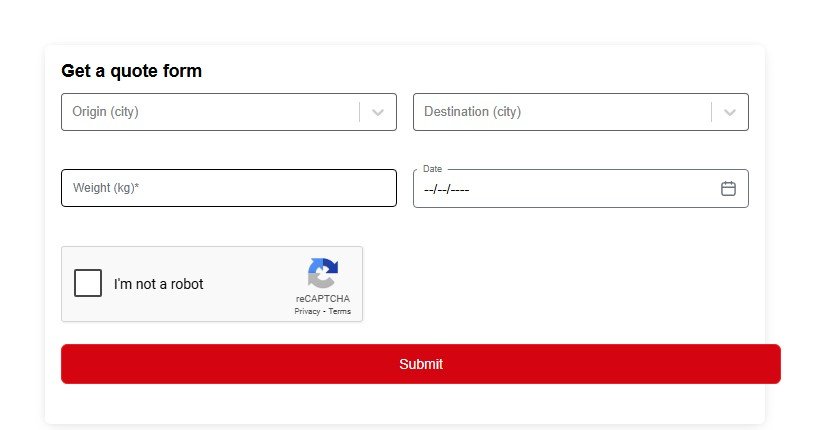
1. Visit the TCS Official Website
Go to the official TCS Pakistan website. From the homepage, navigate to the Rate Calculator section.
2. Select Origin City
- Choose the city from where you will send your parcel.
- Example: Lahore, Karachi, Islamabad, Multan.
3. Select Destination City
- Pick the city where your parcel will be delivered.
- The calculator automatically checks whether it’s same zone, inter-zone, or remote.
4. Enter Weight of the Shipment
- Add the weight of your parcel in kilograms (kg).
- TCS applies different rates for the first kg and for each additional kg.
5. Choose Service Type
- TCS offers Domestic and International shipment services.
- Domestic rates depend on zones, while international rates vary by country.
6. Complete the reCAPTCHA
For security, confirm the “I’m not a robot” verification.
7. Click on “Calculate Rate”
After entering all the details, click the Calculate button. The tool will instantly display the estimated cost of your shipment.
Example of Domestic TCS Rates (General)
Here’s an overview of how TCS charges for domestic deliveries:
- Same Zone (Within Province):
PKR 180 for the first Kg + PKR 180 per additional Kg. - Remote Locations:
PKR 240 for the first Kg + PKR 240 per additional Kg. - Inter-Province (Province to Province):
PKR 200 for the first Kg + PKR 200 per additional Kg. - Sindh to Punjab/KPK/ISB/AJK/Balochistan & Vice Versa:
PKR 250 for the first Kg + PKR 250 per additional Kg.
For international rates (such as UAE Red Box service), visit the TCS UAE website.
Benefits of Using the TCS Rate Calculator
- ✅ Quick and accurate cost estimates.
- ✅ Saves time before visiting the service center.
- ✅ Helps customers plan budget-friendly deliveries.
- ✅ Reduces surprises in shipping bills.
Important Notes
- Rates may vary depending on service type, zone, and package weight.
- Always check the latest rates on the official TCS website.
- For assistance, you can contact TCS customer service at 111-123-456.
Useful Links
Final Thoughts
The TCS Shipment Rate Calculator is a handy tool for anyone sending parcels locally or internationally. By following this step-by-step guide, you can quickly estimate your shipping cost and choose the most suitable TCS service. Whether you’re a business or an individual, this calculator makes parcel planning easier and more reliable.
More information about this website